Try out the new dashboard
The new dashboard is live and ready to try at dashboard.vidbeo.com.
For now, the old dashboard will continue to be available. At some point, we will remove it.
Why make a new dashboard?
The old dashboard became increasingly hard to maintain. The first version of it was originally created way back in 2019 as a SPA (Single Page Application) using Vue 2.
Once Vue 3 became stable, it was later updated. But with each modification, legacy code was left.
That caused problems. The original framework used Webpack as its bundler. At the time, that was the right choice. Today, most people would probably use Vite.
We would regularly get build errors. Those could be fixed however they would always be accompanied by warnings.
Styling
The old dashboard’s appearance was looking dated too.
It was originally based on Google’s Material Design. That made specific choices. For example form input labels were designed to be floating:
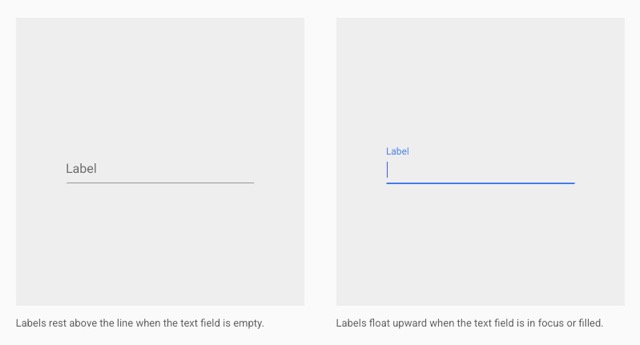
We wanted them to always be shown and appear above the input. That meant using some awkward tricks, like applying a negative margin. This was an ideal opportunity to remove those hacks.
Updated for 2026
It became increasingly clear that rather than continue to maintain the old dashboard, it would be simpler to just start again. That meant looking at what is commonly used in 2026:
- Vite
- React (plus React Compiler)
- Tanstack Router
- Tanstack Query
- Tailwind
Notably, Twitter is also rebuilding its web stack using Tanstack Router and Tailwind,
With no legacy code to adapt, the latest versions of each could be safely chosen. They work together almost seamlessly. There are still some issues (for example making Tanstack Table work with the React Compiler in v8 and v9). However all the build warnings are gone.
Performance
When building the new dashboard, it was important to improve how it worked.
Caching
The main improvement is down to caching.
The old dashboard used a custom cache that would use localStorage to store data. But cache invalidation is hard. It was overlay cautious, only holding data for a period of seconds.
The new dashoard uses Tanstack Query extensively. Also known as React Query, that sits in front of requests to an API. It provides the loading and error states, along with a cache to store and refetch data. Those queries can then be manually invalidated (following a mutation) or left to expire. It supports infinite scrolling too, meaning it is simple to paginate over large amounts of data.
Size
The old dashboard used very basic bundling, outputting two main chunks of JavaScript. One contained the application, and the other contained svendor files (such as Vue).
The new dashboard splits the chunks into many more files. Those are then lazy-loaded. That means files are only loaded when needed, rather than needing a huge file to be downloaded and parsed when the SPA initially loads.
As a result, the dashboard becomes usable faster.
Uploads
In the old dashboard, you had to stay on the upload page while your upload(s) completed. That could be a pain if your upload speed was slow.
The new dashboard moves each file upload into its own, separate Dialog component.
That means you can upload a file, provide some details (such as its title), close that Dialog … and still be able to use the rest of the dashboard while you wait. You can of course upload another file, and have that file upload in parallel. A much better user experience.
Accessibility
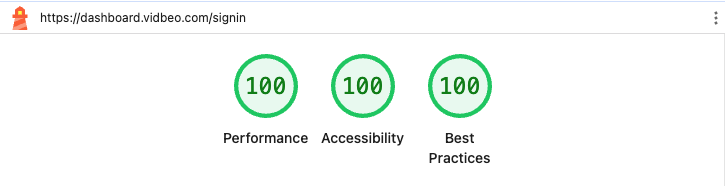
One benefit of using Shadcn UI is that its components have accessbility built-in. Their original component library was based on Radix but they have now switched to defaulting to Base UI. We use that. Base UI’s components include ARIA attributes along with keyboard navigation.
We did some basic checks on the first page (signin) and it’s now much better:
Analytics
The new dashboard is hosted by Cloudflare. Handily, they have their own analytics which avoids needing to load additional scripts:
What does it mean for us to make our analytics “privacy-first”? Most importantly, it means we don’t need to track individual users over time for the purposes of serving analytics. We don’t use any client-side state, like cookies or localStorage, for the purposes of tracking users. And we don’t “fingerprint” individuals via their IP address, User Agent string, or any other data for the purpose of displaying analytics. (We consider fingerprinting even more intrusive than cookies, because users have no way to opt out.)
Their analytics is integrated with our cookie consent banner so you can still opt-out.
Try out the new dashboard and please contact us if you have any problems or questions.
Updated: September 24, 2026