Select a video from Dropbox
To save having to upload it again, you can choose a video file from Dropbox.
Why?
Two main reasons:
-
You (or a client) has already uploaded a file there. Dropbox has over 700 million registered users. Even if you don’t already have an account, you can create one for free.
-
You want to upload it directly but that does not work. Perhaps due to a network error. Upload it to Dropbox instead, then in our dashboard simply select it.
How?
Make sure the video is in your Dropbox. If not, click their ”+ New” button, then choose the video from your local drive.
Then head over to our dashboard.
Click the blue “upload” button. You should see a button to choose a file from Dropbox:
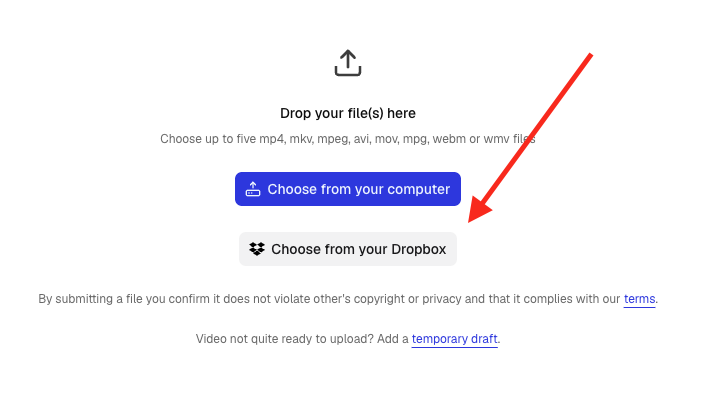
Click that and a small window should pop up (your browser may ask for permission to show a popup).
Select the video file and click the “Choose” button:
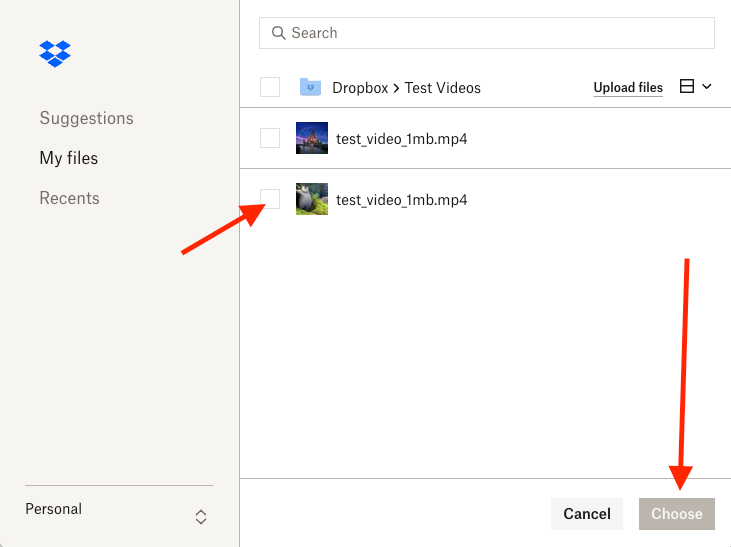
If that worked, you should see the file has been selected. You can then provide a title, description etc as normal. The file will be fetched from Dropbox when you submit it for processing.
Does the API support this too?
Yes. We have supported fetching a file from Dropbox for a while. That feature may need to be enabled for your account. If so, please email us.
Updated: October 4, 2026